 CargoGauge
What CargoGauge actually does
Six capabilities, each shown as it works today. Where something is unfinished, it says so on this page rather than in a conversation three weeks in.
The whole fleet on one map
Every vehicle on an active trip streams its own position while it drives, so the board in front of you is the state of the road right now rather than the last thing somebody phoned in.
-
Positions in real time
The driver’s phone reports as the vehicle moves, so a marker on the map is where that vehicle actually is.
-
Every past trip, replayable
The trail behind a run is kept after the run ends, so months later you can still show exactly where a vehicle went and when it was there.
-
On time, delayed, very delayed
Each run carries its status as a colour, so the map answers which loads need attention before anyone opens a list.
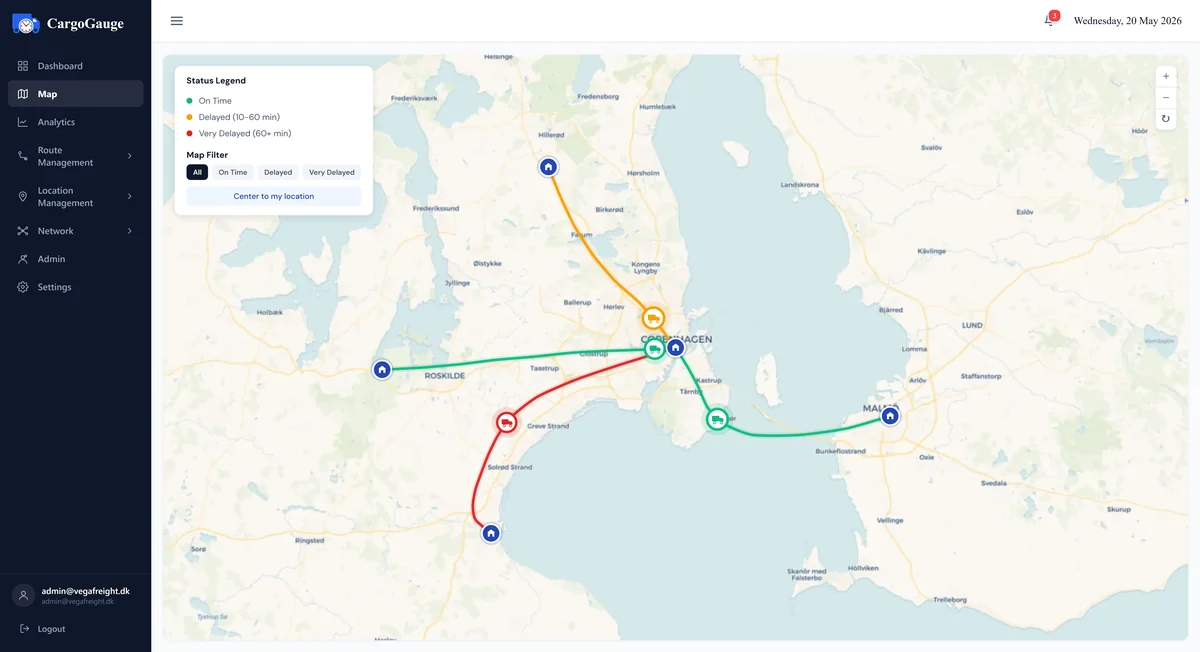
The live map from our product film, running here as real code. The vehicles are moving on invented routes, not live customer data.
An ETA that knows it is a truck
The operator board holds the whole day at once: what is running, what is arriving, and what has already slipped. Every figure on it is computed rather than typed in.
-
The day in four numbers
Assignments running, gates still free, runs on time and runs late. The counters move as the day does.
-
Every inbound arrival in one column
Each ETA is worked out for that vehicle, with mandatory breaks, daily driving limits and ferry sailings already inside it.
-
A late run shows what made it late
Assignment A-4830 is eighteen minutes down into gate G-07 against heavy traffic. The delay and its cause sit on the same row.
-
On time against delayed, live
The split updates as arrivals land, so the question you can answer is how today is going, not how last month went.
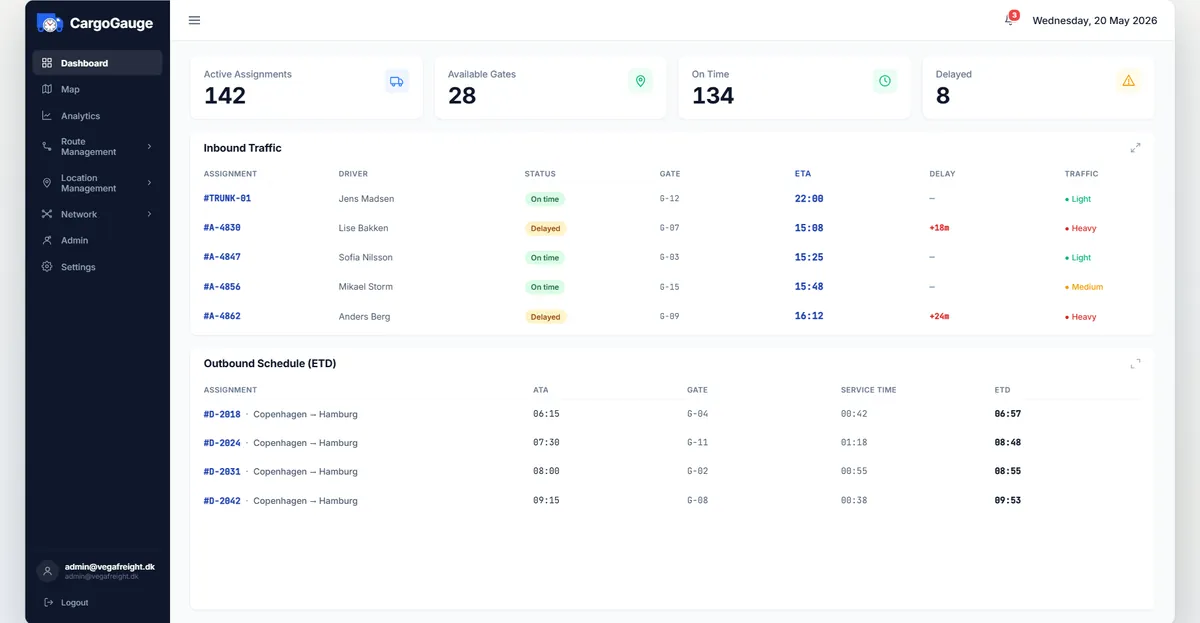
The operator dashboard from our product film, running here as real code. Routes, drivers and figures are examples, not live customer data.
One board for your fleet and theirs
Hauliers who drive for you are not guests on your board. They get their own portal, with their own drivers, vehicles and paperwork, working the runs you dispatched to them.
-
Your register of hauliers
Every subcontractor with their contact, their status and the work they hold, on your side of the platform.
-
They see their own runs
The haulier opens their portal to the assignments you gave them and puts one of their own drivers on each one. Trips already under way are locked.
-
They keep their own drivers
Drivers are created and linked by the haulier rather than by you, so your register stays correct without you maintaining it.
-
Licences and documents tracked
Expiry dates are held against the driver and the vehicle, and flagged before they lapse rather than after.
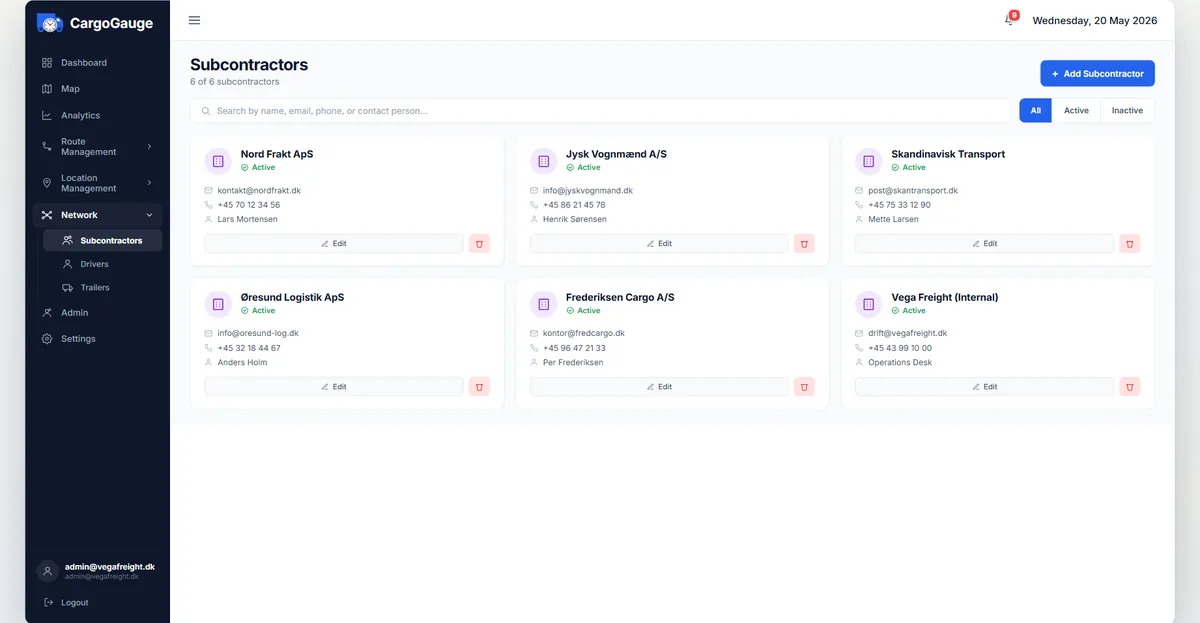
The operator’s subcontractor register and the partner portal, both from our product film and running here as real code. The hauliers and drivers shown are invented for the illustration.
The part the driver actually touches
A tracking tool only works if the driver opens it, so the app is deliberately small: today’s runs, the stops on each one, and a single control to begin.
-
Today’s runs, ready to pick up
The driver opens the app to their own list, with the route name, the vehicle, the date and the stops on every run.
-
The whole trip before it starts
Pickup, delivery and return with their time windows, the addresses, and the vehicle assigned to the run.
-
Slide to start, and tracking begins
A deliberate control rather than a button, so no trip is ever started by a pocket. From that moment the run is live on the operator’s map.
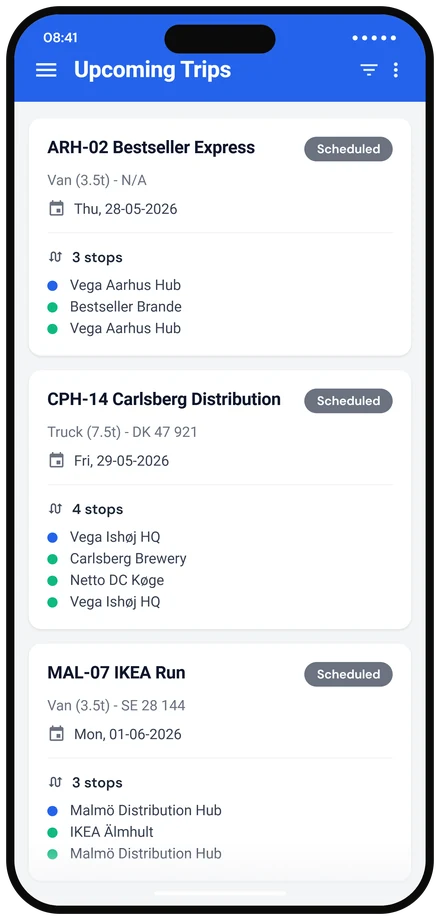
The driver app from our product film, running here as real code. Example stops and times.
What actually happened, once the day is done
A focused set of operational numbers rather than a reporting suite. Enough to tell whether the problem is the road or the dock.
-
An on-time rate you can trust
Measured against the stop windows you set, counting a stop as on time only within five minutes of its window.
-
Where every stop ended up
On time, delayed and very delayed as a share of the whole, so a bad week is a number rather than an impression.
-
Where the time goes
Average minutes spent loading, offloading, doing both, and waiting, per completed stop.
-
Which days go wrong
On-time performance by weekday, so a problem that only happens on Fridays stops hiding inside the monthly average.
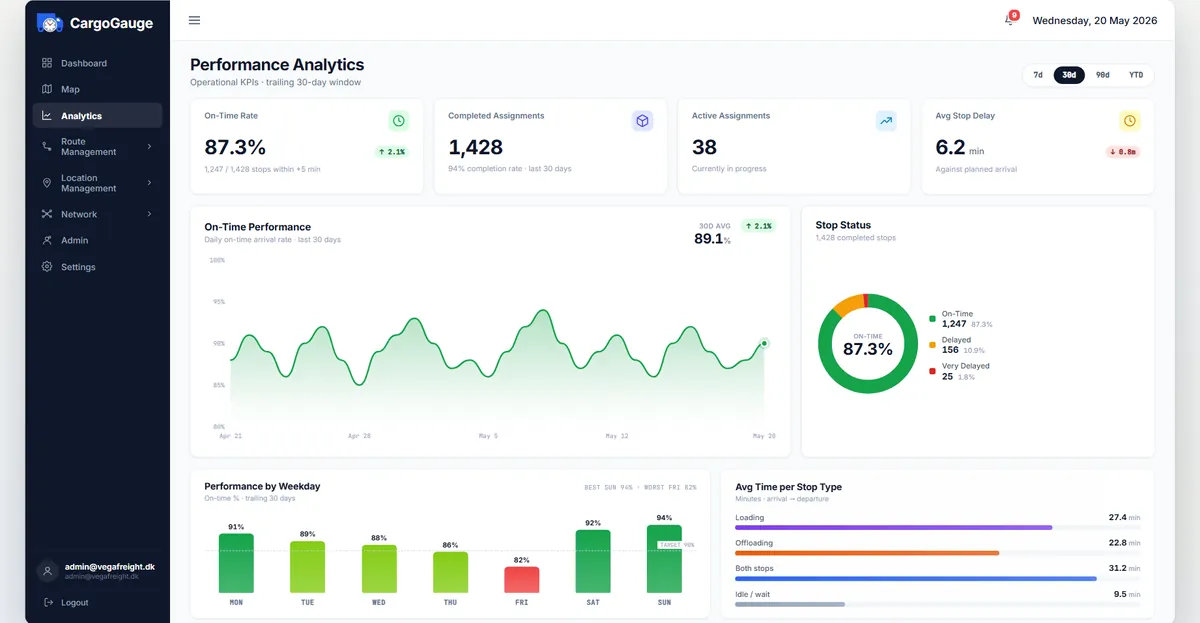
The analytics page from our product film, running here as real code. The figures are examples, not customer data.
The routing knows what you are driving
Build a route from its stops and watch the run appear beside it. Vehicle type is part of the route, so the line that gets drawn is one that vehicle can legally drive.
-
Name it and say what pulls it
A 13.6 metre trailer is not a van. The vehicle type on the route feeds straight into the routing and into every assignment made from it.
-
Add the stops in order
Each stop carries its type, pickup, delivery or return, and how long you expect the vehicle to be there.
-
Hand it to a haulier
A route can run on your own fleet or on a subcontractor’s, set once here and inherited by every trip off the schedule.
-
See the run it produces
The preview draws the actual route, keeping a 40-tonne combination off roads it cannot legally use, which sometimes means a longer line and an honest arrival time.
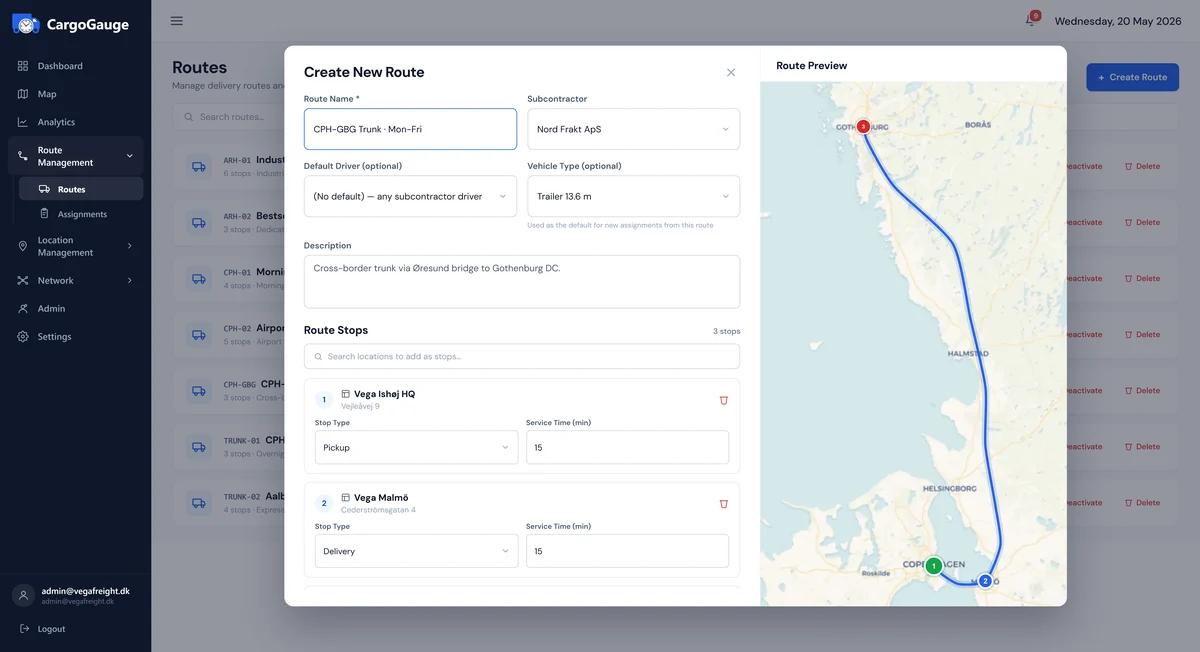
Building a route, from our product film and running here as real code. The stops shown are examples.
What isn’t here yet
Four gaps worth knowing about before you spend time on a demo.
- iOS trip tracking. The driver app builds and runs on iOS, but GPS tracking during a trip is Android-only today.
- Dashboard translations. The driver app speaks 23 languages; the operator dashboard is English only.
- Self-service signup and billing. Accounts are set up with you by hand during early access.
- A public API. Integrations with your TMS or ERP are something we would scope with you, not something you can switch on.
Want to see it on your own routes?
Tell us what you run and we will walk you through the platform as it stands, including the parts that are not finished.
- 30-minute walkthrough
- Shown against your kind of runs
- No commitment